Salesforce
Salesforce Change Alerts in Nine Chat Apps: Slack to Telegram
Published on October 15, 2026
Not every Salesforce team lives in Slack. Some run on Microsoft Teams because the whole company does, some on Google Workspace, some on a self-hosted Mattermost because nothing leaves their network, and some agencies talk to clients on Discord or Telegram. Org Radar now sends Setup changes to all of them: nine chat platforms, from the same app, in the same org.
The nine platforms
Every channel is connected the same way: you create an incoming webhook in the chat app, paste its URL into Org Radar, send a test message, and you are live. What differs is where the webhook comes from.
| Platform | Where the webhook comes from | Good to know |
|---|---|---|
| Slack | A Slack app with Incoming Webhooks, added to the channel | One webhook per channel |
| Microsoft Teams | The channel's Workflows: "Send webhook alerts to a channel" | Own the workflow with a technical account, so it survives people leaving |
| Google Chat | The space's Apps & integrations, Webhooks | Google Workspace, with webhooks allowed by your admin |
| Zoom Team Chat | The Incoming Webhook app from the Zoom App Marketplace | You paste a URL and a verification token |
| Webex | The Incoming Webhooks integration in Webex App Hub | Long digests switch to shorter messages on their own if a space needs them |
| Mattermost | Integrations, Incoming Webhooks | Self-hosted: messages stay on your own server |
| Rocket.Chat | Administration, Integrations, a new Incoming integration | Self-hosted, version 7.4 or later |
| Discord | Server Settings, Integrations, Webhooks | Can post into a thread or a forum post |
| Telegram | A bot made with @BotFather, added to the group | Works in groups and in forum topics; use a bot just for Org Radar |
The steps for each platform are shown right next to the field where you paste the URL, so nobody has to look them up.
One digest, native in every app
A digest should read like it belongs in the app it arrives in. Org Radar writes each message in the format of its platform, so a Slack channel, a Teams channel and a Telegram group all get the same content: who changed what, in which Setup section, when, with High and Medium sections marked and the entries of one operation grouped into one numbered item.
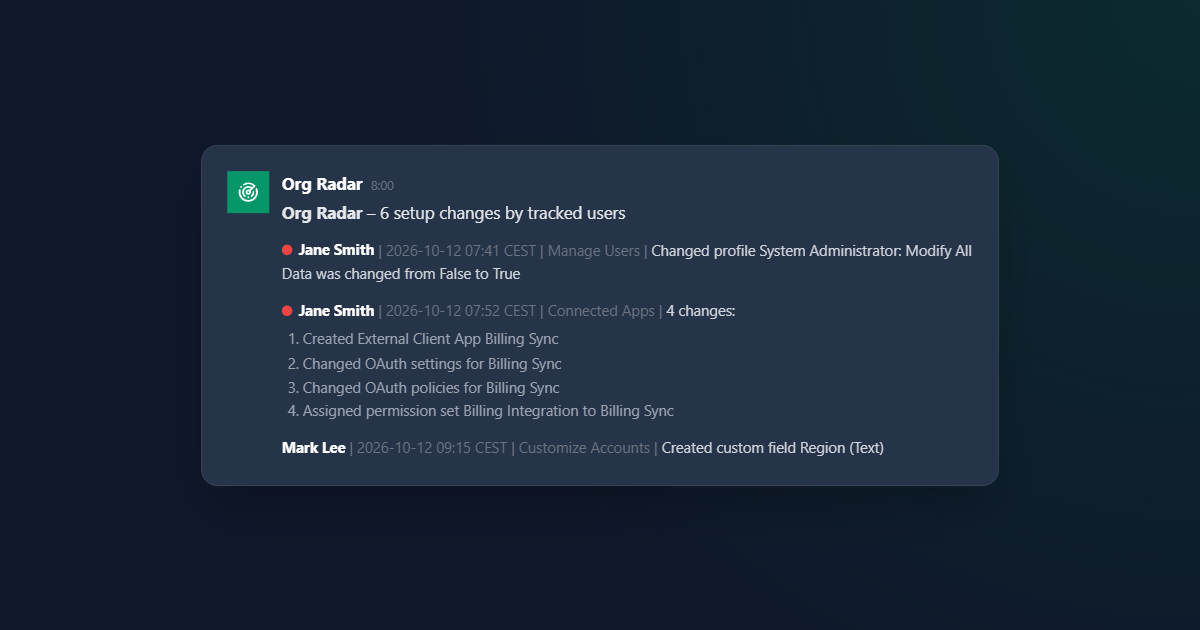
Each platform also has its own limits on message size and on how fast you can post. Org Radar keeps within them. A large digest is split into several messages with continuous numbering, and when a platform asks it to slow down, the messages already delivered stay delivered and the rest follow in the next run.
Safe to post anywhere
Audit entries are written by Salesforce, but parts of them come from whatever people typed into Setup. A posted digest must not turn that text into something else on the way. On every platform:
- Secrets are masked. Tokens and webhook URLs quoted in audit entries are hidden before anything leaves the org, for all nine platforms' URL formats.
- Nobody gets pinged by accident. A field label like "@all" or "@channel" stays plain text instead of notifying the whole channel.
- Links stay text. Domains and URLs from audit entries are not turned into clickable links or previews.
- The webhook stays in Salesforce. Its URL is kept in a Named Credential, not in a custom setting or a record, and every change to it is announced on all channels.
Mix platforms, per channel
A channel is just a webhook, so you can connect as many as you need, on different platforms. Each channel can have its own severity for each Setup section and its own list of tracked people. A few setups we see:
- The admin team on Slack gets everything; the security team on Microsoft Teams gets only users, permissions and security settings.
- A company on a self-hosted Mattermost keeps the digest inside its own network, next to the rest of its operations alerts.
- An agency gets each client's production changes in that client's Discord server or Telegram group, where the conversation already happens.
Changes to Org Radar's own setup, including who is tracked, are announced on every channel, whatever the platform.
Still no server in the middle
Adding platforms did not add an Overrly server. Org Radar is a native Salesforce app: messages go from your org straight to your chat app's webhook, and with Mattermost or Rocket.Chat, straight to your own server. We never see your audit data.
New to Org Radar? Start with who changed production?, or see the Org Radar page.
Your chat, your production changes
Tell us which chat your team uses and we will set Org Radar up with you.
Get in touchKeep reading
Salesforce
One Checkbox in Production: How Salesforce Orgs Break Quietly
A validation rule on Friday, failed orders on Monday. How small manual changes in Salesforce production turn into incidents, and how to see them within the hour.
Salesforce
Who Changed Production? Salesforce Setup Changes in Your Team Chat
Salesforce records every Setup change, yet teams find out only after something breaks. How to see who changed production in Slack, Teams or Google Chat.